I Let My Coding Agent Manage My Notion Tasks. Here's What I Learned.
The Problem
I manage my tasks in Notion. That’s my brain — tasks, projects, time tracking, all connected. But interacting with it through the GUI was… tedious. I’d have to open Notion, click around, find the right database, edit the card. I’d be in the middle of a coding session with my agent, realize I need to create a follow-up task, and the context switch was brutal.
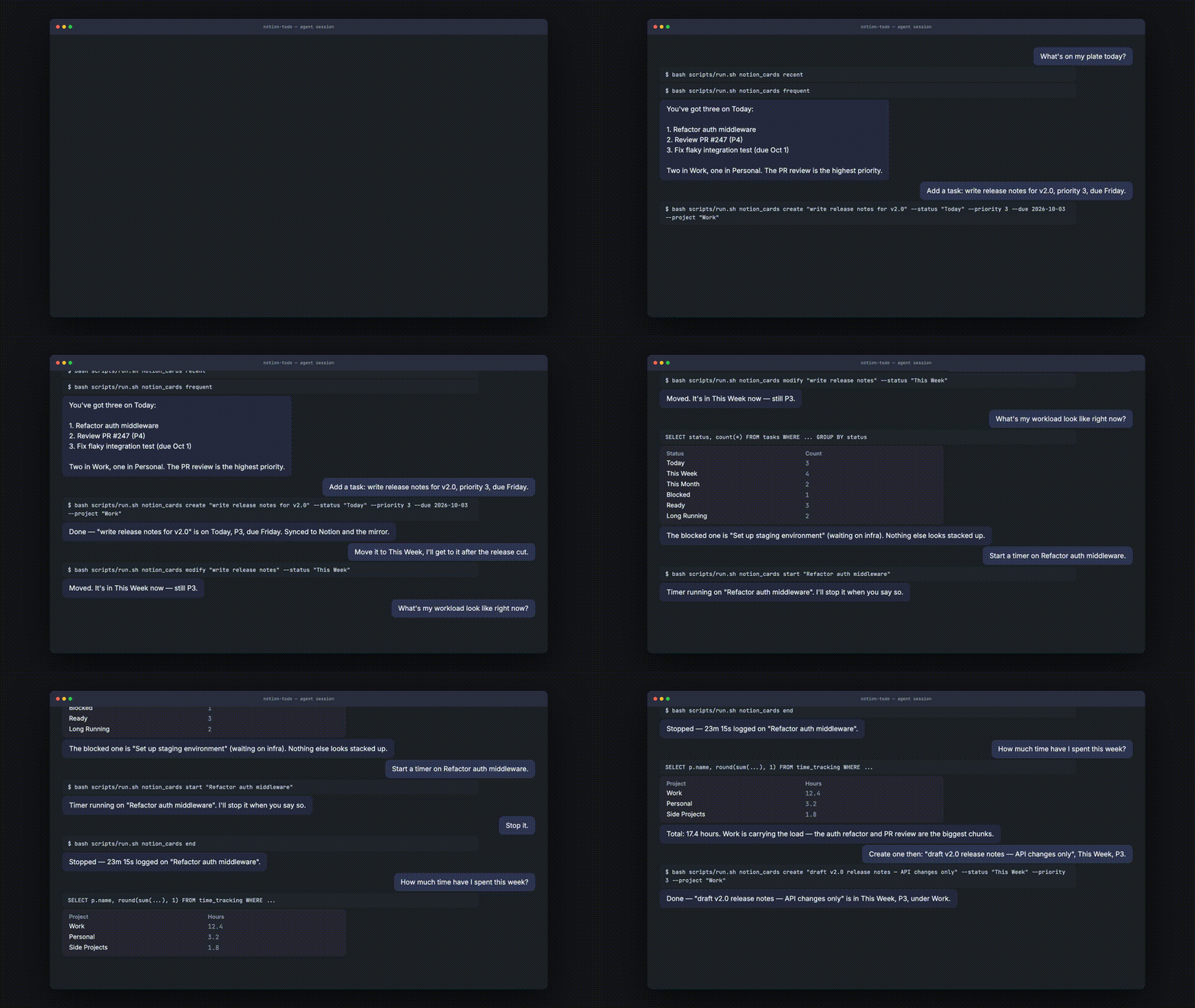
What I wanted was simple: talk to my agent in natural language, and it manages my Notion tasks for me. “Add a task: fix the login bug, due tomorrow.” “What’s on my plate today?” “Start a timer on the auth refactor.” Done. No GUI.
The Architecture
The solution is notion-todo — a coding agent skill with three layers:
- Notion is the source of truth. The human UI. Where cards live.
- A local SQLite mirror keeps a fast, queryable copy. The agent reads from this, not from the API.
- A CLI script (
notion_cards.py) handles all mutations — create, modify, delete, time tracking, comments. Every mutation auto-syncs the mirror.
┌─────────────────────────────────────────────────────────────┐
│  User (natural language)                                     │
└─────────────────────────────┬───────────────────────────────┘
                              │
                              ▼
┌─────────────────────────────────────────────────────────────┐
│  Agent (LLM) — interprets intent, picks the right action    │
│  guided by SKILL.md (prompt)                                │
└─────────────────────────────┬───────────────────────────────┘
                              │
                              ▼
┌─────────────────────────────────────────────────────────────┐
│  CLI Script (deterministic) — notion_cards.py               │
│  handles CRUD, time tracking, comments, sync                │
└──────────┬──────────────────────────┬───────────────────────┘
           │                          │
           ▼                          ▼
┌──────────────────────┐    ┌──────────────────────────┐
│  Notion (source of   │◄──►│  SQLite Mirror (fast     │
│  truth, human UI)    │    │  reads, agent queries)   │
└──────────────────────┘    └──────────────────────────┘
The Challenge: I Wasn’t Writing Scripts
At first, I didn’t write any scripts. I just gave the agent a description of my Notion databases and told it “here’s how the Notion API works, go create a card.” The agent had to figure out the HTTP calls, construct the JSON payloads, handle relations, deal with the mirror sync — all on its own, every time.
It almost worked. But the failure rate was high. The agent would miss a property, use the wrong database ID, construct a malformed relation, forget to sync the mirror. Each mistake meant a retry, which meant more tokens, more latency, more chance of cascading failure. It was like giving someone a complex tool without the manual — they can use it, but they’ll fumble.
The fix was simple in hindsight: write scripts for the deterministic parts.
I built a CLI (notion_cards.py) that handles all CRUD operations, time tracking, comments, and sync. The agent no longer needs to know how Notion’s API works. It just runs:
bash scripts/run.sh notion_cards create "Fix login bug" --status "Today" --priority 5
The success rate went from “flaky” to “consistently correct.” The agent’s job became what it’s actually good at: interpreting natural language and deciding which command to run.
The Principle: Scripts for Determinism, Prompts for Flexibility
| Script it | Prompt it |
|---|---|
| CRUD operations | Interpreting natural language |
| Sync logic | Resolving ambiguous references |
| Time tracking state | Choosing which query to run |
| File I/O, schema migrations | Deciding when to confirm vs. act |
The skill file is your prompt engineering. The scripts are your deterministic backbone. Without the scripts, the agent is reinventing the wheel every call and failing often enough to destroy the user’s trust in the whole system.
The Second Challenge: Folder Resolution
My project has a .venv, a mirror.sqlite, and a scripts/ directory, but the agent doesn’t know where “project root” is. It would look for .venv in the current working directory, find nothing, and give up. The fix was a run.sh wrapper that resolves everything relative to its own file location — the agent just runs bash <root>/scripts/run.sh notion_cards ... and the wrapper figures out the rest. The skill file tells the agent: “walk up from cwd to find the directory containing pyproject.toml and .venv — that’s the root.”
What I’d Tell Someone Building Their Own Skill
- Your skill file IS the prompt. Write it for the agent, not for humans. Be precise about invariants, confirmations, and edge cases.
- Don’t make the agent do what a script can do. If the operation is deterministic, script it. The agent’s job is to decide what to do, not how.
- Fuzzy matching is what makes it feel natural. Let the agent say “the login one” instead of requiring exact names. A unique-substring resolver is 20 lines of Python and worth its weight in gold.
The Result
My agent now manages my tasks the same way it manages my code. “Start a timer.” “Stop it.” “How much time did I spend this week?” It’s fast, it’s reliable, and I stay in flow. The GUI is still there if I need it — but I rarely reach for it.
If you use a coding agent and keep your tasks in Notion, notion-todo is open source and MIT licensed. Getting started takes about a minute:
npm install -g notion-todo
Then link the skill into your agent:
| Agent | Command |
|---|---|
| Claude Code | ln -s "$(npm root -g)/notion-todo/skills/notion-todo" ~/.claude/skills/notion-todo |
| Codex | ln -s "$(npm root -g)/notion-todo/skills/notion-todo" ~/.codex/skills/notion-todo |
| Pi | pi install notion-todo |
| Any Agent-Skills agent | ln -s "$(npm root -g)/notion-todo/skills/notion-todo" ~/.agents/skills/notion-todo |